


PowerFlex
4.7226.00 Reviews
App Specs
- Version
- 4.5.15
- Updated On
- License
- Free
- Downloads
- 50,000+
- Developer
- PowerFlex
- Categories
- Auto & Vehicles
- Platform
- Android
Screenshots
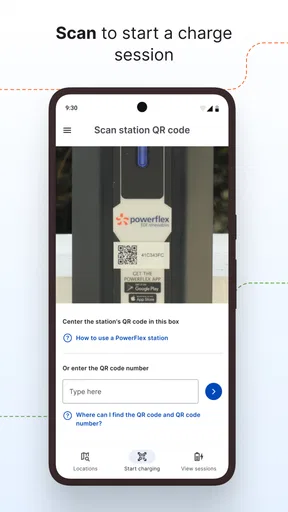
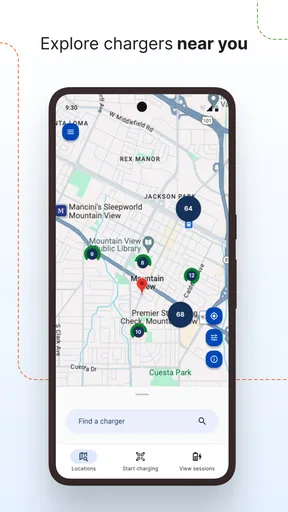
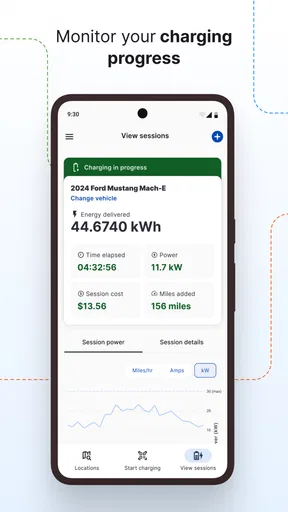
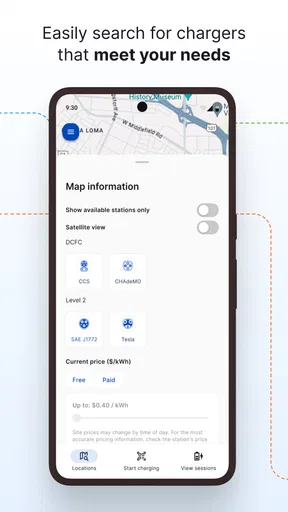
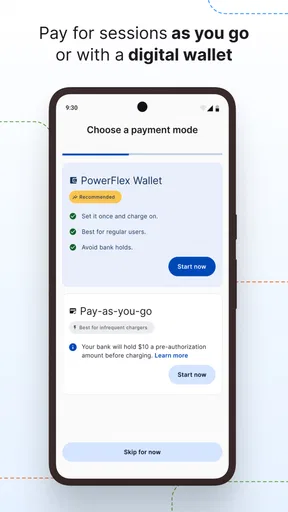
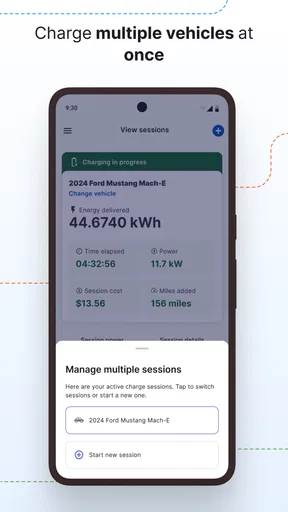
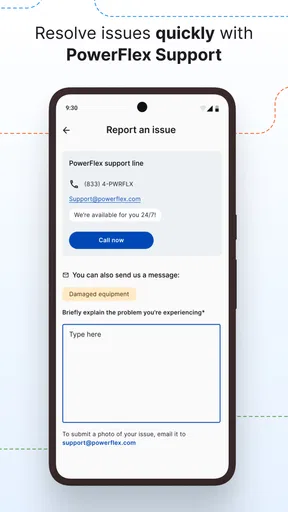
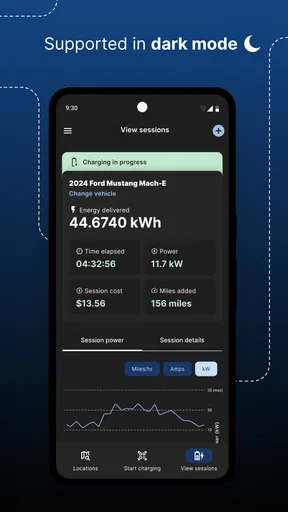
 Analysis by AppCompare
Charging an electric car sounds simple until the practical questions begin: Is the station available, how do I start the session, and can I keep track of what is happening while I am away from the vehicle? PowerFlex is an Auto & Vehicles app built around PowerFlex Adaptive Charging Stations, and I found its value less in flashy extras than in making charging feel more organized. It is free, aimed at Everyone, and developed by PowerFlex, so it is easy to try if its charging network fits your routine.
My overall impression is cautiously positive. The app can be useful when you regularly visit locations with compatible PowerFlex stations, especially workplaces, residential communities, campuses, or other managed parking areas. It is much less compelling as a universal charging companion if you expect one app to cover every public charger you encounter. That distinction matters more than the attractive store rating of 4.8 from around 1.1 thousand ratings: the real question is whether the stations you need are part of the same ecosystem.
How PowerFlex fits into everyday charging
I would describe this as a network-specific charging tool rather than a general electric-vehicle dashboard. Its job is to help you interact with PowerFlex charging locations, not to replace every navigation, vehicle, or payment app on your phone. That focused purpose is useful because a dedicated station app can keep the charging workflow in one place instead of making you search through unrelated menus.
A realistic example is an office worker who arrives in the morning, parks near a PowerFlex station, and wants to begin charging without returning to the vehicle repeatedly. The app is most helpful when the driver already knows the location and needs a practical way to manage the session from the phone. The same applies to someone living in a building with shared charging equipment: the app becomes part of a recurring parking routine rather than something opened only during a road trip.
That narrow focus also creates the first important limitation. If your regular charging happens at stations operated by several unrelated networks, PowerFlex will not automatically become a complete solution just because it is installed. I would keep the app if PowerFlex stations are part of my daily route, but I would not rely on it alone for long-distance planning or mixed-network travel. A broader charging directory or the vehicle maker’s own application may be better for that job.
The app has been available since January 11, 2018, and its current version is 4.5.15. It supports devices running Android 8.0 or later. Those details make it approachable for people who keep an older phone, although anyone using an older operating system should check compatibility before building the app into a regular charging habit.
Trust starts with a clear, limited purpose
When I judge a charging app, I first ask whether its purpose is easy to understand. PowerFlex passes that basic test: it is connected to charging stations carrying the same name, and its store summary presents it as a way to charge smartly through those stations. There is less ambiguity than with an app that mixes charging, vehicle insurance, route planning, maintenance, and unrelated services.
Worth Reading Before You Choose

EA SPORTS FC Mobile 26 Is a Bigger Football Game, but It Takes Time

Flipboard Shows What News Apps Must Do Beyond the Feed

Switching to Android Auto Means Rethinking Your Driving Routine

Google Calendar Makes a Crowded Week Easier to Manage

Ludo King Makes the Most of the Minutes Between Plans

Baby Panda World Brings Quick Play to Modern Phones, but Its Game Library Feels Busy
That clarity helps with trust because I know why I am opening it. I am not expecting it to diagnose my car or act as a replacement for the vehicle’s controls. I am using it as a bridge between my phone and a compatible charging location. In my experience, keeping that boundary in mind prevents disappointment and makes it easier to notice whether the app actually suits my needs.
The store shows more than 50 thousand installs and around 226 written reviews, which suggests that it has a real user base without making it one of the enormous, universal charging platforms. I read those figures as context rather than proof that every station or workflow will feel identical. Charging experiences can depend heavily on the location, the parking rules, and how the station has been configured for its site.
For me, the strongest trust signal is not the popularity figure but the app’s practical role. A tool that helps me interact with a station is easier to evaluate than one making broad promises about the entire electric-car experience. I still want to pay attention to the screens it presents, the permissions it requests, and the choices it gives me during setup and charging.
What I would check before depending on it
Before making PowerFlex part of my daily routine, I would confirm three things at the actual parking location. First, I would look for the PowerFlex branding or station information. Second, I would check whether the site expects app-based interaction or provides another method as well. Third, I would make sure I understand any local parking rules, because a charging app cannot override a building’s time limits or enforcement.
This is a small but important workflow improvement: install and sign in before arriving at a busy station, rather than trying to create an account while blocking a charger. I would also open the app on a normal connection before leaving home, so I know it launches properly on my phone. That preparation is more valuable than memorizing a long list of features, because the stressful moment is usually the first attempt to charge, not the later monitoring.
I would keep the vehicle’s own charging controls available as a backup. Depending on the car, those controls may be better for setting a charging limit or scheduling charging inside the vehicle. PowerFlex should be treated as the station-facing part of the process, while the car’s settings remain the place to manage vehicle-specific preferences. That separation avoids searching for a control in the wrong app.
Account controls and visible choices
A charging app handles a more sensitive moment than an ordinary parking map: it may be involved when a person starts a session, manages access, or reviews charging activity. I therefore pay attention to whether the app makes the next action obvious and whether I can tell when a session is active. Clear status information matters because leaving a charger connected can affect other drivers and may interact with site rules.
My advice is to slow down during the first session. Read each confirmation screen instead of tapping through automatically, especially when the app asks you to choose a station, connector, or charging action. If several stations are visible in one parking area, verify the physical identifier against what appears on the phone. Selecting the wrong station is an avoidable mistake, and a few seconds of checking can prevent a confusing start.
I also prefer to review account and notification settings after installation rather than accepting every default without looking. The useful question is not simply whether notifications exist, but whether I can understand why the app wants to notify me and whether those alerts fit my routine. A driver who charges at work may want timely session information, while someone who uses the app only occasionally may prefer fewer interruptions.
Because the app is free, the initial barrier is low. That does not mean every part of the charging experience is cost-free: the station owner, location, or charging arrangement may determine what happens financially. I would always read the in-app confirmation and the site’s posted terms before starting a session, rather than assuming that a free download means free electricity or parking.
Data-sensitive moments during a charging session
The most privacy-sensitive parts of this kind of app are easy to overlook because they happen during ordinary actions. Location information can be relevant when identifying nearby stations, while account details and session records can matter when managing access or reviewing activity. I do not treat those possibilities as automatically negative, but I do want the app to make its requests understandable at the moment they appear.
My practical approach is to grant only the access that supports a feature I actually intend to use. If I am standing beside a known station, I may not need every location convenience available. If I am searching for a compatible station in an unfamiliar area, location access could be more useful. The best choice depends on the task, and Android’s permission controls give me a way to revisit that decision later.
I would also avoid creating unnecessary exposure through the phone itself. A lock screen can display notification text, so I would check whether charging alerts reveal information I would rather keep private. This is especially relevant for a shared workplace or residential setting where other people may see the phone. Adjusting notification previews at the operating-system level is a simple step that many users forget.
Another useful habit is to review the account after a few charging sessions. I would look for unfamiliar activity, old vehicles, or locations that no longer apply to me, and remove anything I do not recognize or need if the available controls allow it. This is not a criticism of PowerFlex specifically; it is sensible maintenance for any app connected to a recurring service.
I would not use the app while driving. Even if the task seems quick, starting or checking a session belongs in the parked workflow. If I need to make a change on a road trip, I would pull over safely or ask a passenger to handle it. A charging convenience is not worth turning into a distraction.
Where the app gives me useful control
The strongest use case is repeat charging at a familiar location. Once I know which station I normally use, the app can become a predictable part of arriving, connecting the cable, checking the station selection, and confirming the session. That repeatability is more valuable than having a crowded home screen full of tools I rarely touch.
A less obvious benefit is separating arrival planning from charging confirmation. I can decide where I want to park before opening the app, then use the app only for the station interaction. This reduces the chance of making a rushed choice while walking through a crowded lot. It also makes troubleshooting easier: if the physical cable, vehicle, and station are already identified, I can focus on the exact step that failed instead of guessing.
For shared charging, I would pay close attention to the end of the session. The person who starts charging is not always the person who returns immediately, particularly at a workplace or apartment building. I would set a personal reminder in addition to any app notification, because a phone alert can be missed during a meeting or overnight. That small backup protects both my schedule and access for other drivers.
I would also keep a note of the station identifier I used successfully. This is not glamorous, but it helps when a site has several similar chargers. On a later visit, I can compare the label on the equipment with the station shown in the app instead of choosing by appearance. That is one of the most practical ways to reduce errors in a multi-station location.
For people who share a car, account habits deserve extra thought. I would agree with the other driver about who starts and ends sessions, who receives notifications, and which vehicle details are maintained. Without that simple agreement, two people can assume the other person is monitoring the charge. The app may support the charging task, but it cannot replace a clear household routine.
How it compares with usual alternatives
Compared with a car manufacturer’s app, PowerFlex is more closely tied to the charging location. The vehicle app is usually the natural place for battery status, remote climate controls, charging limits, and car-specific scheduling. PowerFlex makes more sense when the immediate issue is interacting with a compatible station rather than managing the vehicle itself.
Compared with a broad public-charging app, PowerFlex offers a more focused experience but a narrower reach. A multi-network service may be better when I am planning a route, comparing unrelated operators, or traveling through places where I have never used a PowerFlex station. The trade-off is that a broad app can feel less direct when I repeatedly charge at one managed location.
Compared with using a station’s physical controls or another access method, the app can be convenient when I want phone-based confirmation and a record of the session. However, I would not assume the phone is always the fastest option. A weak connection, a nearly empty battery, or an unfamiliar login can make a physical alternative preferable if the location provides one. My ideal setup is not app-only; it is app-first with a practical backup.
That comparison leads to a simple decision rule. Choose PowerFlex if compatible stations are part of your normal life and you value a dedicated way to manage them. Choose a broader service if your charging is spread across many networks. Choose the vehicle maker’s app if your main concern is battery management inside the car. In some cases, keeping all of them is reasonable, but each should have a clearly defined job.
Small frictions that affect the experience
The biggest friction is network dependence. The app’s usefulness rises sharply when the right station is nearby and falls just as sharply when it is not. That is not a flaw in the idea of a dedicated network app, but it does mean new electric-car owners should avoid assuming that one installation solves every charging problem.
There is also a human-factor issue: charging involves several physical and digital steps, and the app is only one part of them. The cable may not be seated correctly, the car may have its own charging schedule, or the parking space may have rules that are easy to miss. When something goes wrong, I would check the vehicle display, the station itself, and the app status in that order rather than repeatedly tapping the same control.
Another limitation is that convenience depends on account readiness. If I wait until the exact moment I need power to install, register, or adjust permissions, the process can feel much more frustrating than it would at home. I recommend doing the initial setup before the first urgent charge and keeping the phone updated enough to run the current version comfortably.
For privacy-conscious users, the app deserves the same careful review as any service connected to location and usage activity. I would read the privacy and permission screens in the app store and on the device, then revisit permissions after trying the features I need. That is a better approach than either trusting blindly or rejecting the app without examining the actual choices presented.
Who should use it, and who should skip it
I would recommend PowerFlex to drivers who regularly encounter PowerFlex Adaptive Charging Stations, want a dedicated charging workflow, and are comfortable checking station details before starting. It is also a sensible choice for someone who prefers to keep charging actions separate from the vehicle manufacturer’s broader app.
I would be more hesitant to recommend it as the only charging app for a new EV owner who travels widely. That driver needs broad station discovery and route planning first, then can add PowerFlex for locations where it is supported. I would also suggest skipping it if there are no compatible stations near home, work, or regular destinations; an app that rarely connects to a useful charger will only add clutter.
Families and shared-car households can use it successfully, but only if they agree on account responsibility and session monitoring. Someone who dislikes managing phone accounts or notifications may prefer a simpler access method when the station offers one. The right choice is not about being enthusiastic about apps; it is about choosing the least complicated reliable workflow.
My cautious verdict
PowerFlex is a focused, free charging app that makes the most sense inside the PowerFlex station ecosystem. I like its clear role and the way it can turn a repeated workplace, residential, or destination-charging task into a familiar routine. Its 4.8 average and growing install base make it worth considering, but neither figure removes the need to check whether compatible stations actually serve your routes.
My recommendation is to treat it as a useful station companion, not a universal electric-car command center. Install it when PowerFlex equipment is part of your everyday parking, prepare the account before your first urgent session, verify the physical station carefully, and keep a backup plan for network or phone problems. With those expectations, it can be a practical addition to an EV owner’s toolkit. Without a nearby PowerFlex location, a broader charging alternative will probably serve you better.
Pros
- Simple interface makes workouts easy to start and follow.
- Supports strength-focused routines for different fitness levels.
- Exercise demonstrations help users understand proper movement.
- Useful for tracking progress and maintaining training consistency.
- Can motivate users with structured goals and workout plans.
Cons
- Some advanced features may require a paid subscription.
- Workout variety may feel limited for experienced athletes.
- Requires compatible equipment for many strength exercises.
- Progress tracking may not replace a dedicated fitness journal.
- Results depend heavily on consistent training and proper technique.
FAQs for PowerFlex
What is PowerFlex and what can I use it for?
PowerFlex is generally presented as a fitness and workout-focused app designed to help users organize exercise sessions, follow training routines, and monitor progress. Depending on the version available on your device, it may include guided workouts, strength or flexibility exercises, planning tools, and progress tracking. Before downloading, check the app description to confirm which features are included in the current Android or iOS release.
Is PowerFlex suitable for beginners, or is it intended for experienced athletes?
PowerFlex can be useful for different fitness levels, but the experience may depend on the routines and customization options offered in your version. Beginners should start with lower-intensity exercises, read the instructions carefully, and avoid increasing difficulty too quickly. Experienced users may appreciate more demanding sessions or structured plans. Always consider your physical condition and consult a professional if you have health concerns.
Does PowerFlex require an internet connection or a subscription?
Some PowerFlex features may work offline after content has been downloaded, while other functions—such as account synchronization, online workout libraries, advertisements, or cloud-based progress tracking—can require an internet connection. The app may also offer optional paid plans, in-app purchases, or premium content. Review the store listing and subscription terms before installing so you understand what is free and what may involve recurring charges.
What personal information or permissions does PowerFlex request?
The permissions requested by PowerFlex can vary according to the platform and the features enabled. A fitness app may request access to notifications, activity data, health information, storage, or an account for saving progress. Grant only the permissions that are necessary for the functions you want to use. It is also recommended to read the app’s privacy policy to learn how workout data and personal information are collected, stored, and shared.
Can PowerFlex replace a personal trainer or medical advice?
PowerFlex can be a convenient tool for following exercise routines and building consistency, but it should not be considered a replacement for a qualified personal trainer, physiotherapist, or doctor. Exercise instructions may not account for injuries, medical conditions, or individual limitations. Use proper form, stop if you experience pain or unusual symptoms, and seek professional guidance before beginning a new fitness program, particularly if you are returning after an injury or have an existing health condition.


